Monday, October 29, 2007

Week Twelve- Social and Ethical Issues

LECTURE:


Wow its the last enrty today, time really flies =]

The lecture introduced some problems that are associated with the Internet, Internet information and Internet users. These problems are due to copyright information, plagiarism, security and privacy. The lecture today also stated the characteristics of these problems and what happens when someone disobeys or misconduct. Here in ECU any misconduct or plagiarism results in assignments not being accepted or in a more serious case expelled from the University.

WORKSHOP:


The final workshop activity and blog entry of the semester. Today the workshop consisted in looking at laws of misconduct and plagiarism.
I think the most relevant for an undergraduate is the Assigning and Licensing Rights and Internet: Copyright and Downloading. This is important as the assignments that are submitted in ECU falls under this and saying that the assignment is entirely your work. By signing a sheet in ECU's case a cover sheet. Some other rights that be relevant are
The Assigning and Licensing Rights.

Photo Sharing and Video Hosting at Photobucket


*Media and Music Studies
*Film
*Music
*Dance
*Art
*Artwork
*Computer Studies
*Computer Software

The next activity consisted in having to do a summary of the Australia vs U.S copyright laws.
The Australian vs U.S copyright laws says that they have somewhat an identical laws with different exception. In saying that it consist of copyright laws that can be done without permission in U.s can't be done in Australia. This is probably some the most recognizable copyright laws.

All in all they are somewhat the same having same laws for copy right materials.
The last acivity is plan to protect myself from threats, viruses and trojans
Having a good Internat security such as Norton Anti Virus is a good way to protect myself from Viruses and Trojans, By having a daily routine checks of my computer. Also having spam blockers is good thing to prevent my computer from being spam.

READING:

The last reading is focued on Viruses, Threats and Trojans and how to protect against these things. The reading also mentions a brief history of they are created and how they are distributed through via E-mail. The reading also metioned the Copyright and the Internet Laws that one must adhere in order to prevent any misconduct.

WooOOoOhHhoOoo Finally finished! hope you enjoyed my BLOG! =D

Week Eleven- Building Knwoledge

LECTURE:

Today the lecture was about Data, Information and Knowledge. The lecture began by giving a brief definition of Data, Information and Knowledge. Each had a different characteristics in and how they are different. As the lecture proceeded these each are connected as Information must be relevant to the Data and Knowledge must be a justification of both Data and Information. These three can be Incorporated with the assignments using different strategies.

WORKSHOP:

The workshop today asked me to find dictionary meanings of these terms: Data, Knowledge and Information.
Data - Is a form of factual information which has no bias, and has no intrinsic meaning or value.
Infromation - Has no uncertain value, but has strong meaning and it is permanent and it summarizes everything.
Knowledge - Is extremely valuable and can be subjected to bias it can be general or specific.
the next part to this was to draw a representation ot these term which is seen below

Photo Sharing and Video Hosting at Photobucket


As shown on the diagram Data any Information are connected since having data is pretty mush useless without the information. By having knowledge of these two you summarise both information and data. This has been proved to be very useful when gathering information for a student, since finding data and having information helps me gain knowledge and understanding of it.

The last activity for this workshop includes 5 organisations that might collect data, information and knowledge.


Fast Food Restuarants - They collect it for things such as records of sales, money earned in a month if the restuarant is profiting or losing profits
Banks - Collect information on their customers such their withdrawal and deposits monthly.
Retail Outlet (Coles/Myer/K-Mart) - Obtain information on stocks also the same as a restaurants check for profits.
Schools - Check records of students and how well they are going with their studies.
Medical - Medical records shows history of patients to help treat patients.

READING:

In week eleven's reading, we were given the sites,
http://www.systems-thinking.org/dikw/dikw.htm , http://camellia.shc.edu/literacy/index.html and reading_Mod02-1-3.pdf .

Each reading site consisted in a complete explanation of Inforamation, Data and Knowledge to expand on the breif explanation in the lecture today. It also consisted more information on how these can relate to Assignments and help a student gather information. These was quite beneficial to me as i established some new tips on how to gather better and more quility information and data.

Week Ten- Online Libraries And Databases

LECTURE:

Today's lecture was about the introduction of online libraries and databases. The lecture was divided in two parts Online Libraries then Online Databases.
The first part of the lecture gave a brief introduction on how online libraries work, why we should use it and the types of online libraries. The lecture also gave us multiple examples of online resources. It also stated the limitations of online libraries and why it should be referenced correctly to avoid copyright issues.
The second part showed how online databases work which are almost similar to online libraries. It also gave us examples such as E-mail directories, people searches, maps and atlases etc. Some of the advantages and disadvantages were shown for the online databases.

WORKSHOP:

The workshop consisted of me looking through 2 websites and finding any useful functions it might have. The first website was the ECU library website where I am to list 10 useful functions of the site.

1.Journal Articles
2.ECU Referencing Guide
3.Quick Catalogue Search
4.Websites
5.Books, CD's and More
6.Library Podcast
7.Resources for Students
8.ECU Library
9.Ask the Library
10.SIMO

Photo Sharing and Video Hosting at Photobucket


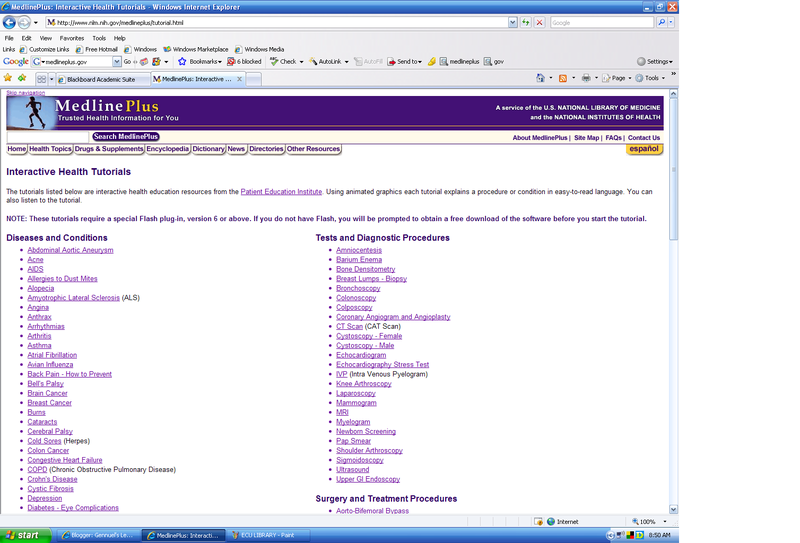
The second activity consisted in finding out who might find the interactive tutorials useful.
I think that this website is design to give information about the topic chosen from the list whether it is AIDS, Hepatitis or Malaria etc.

This website is useful for anyone who want to obtain any information on these medical topic just although not brief it just like a online lecture introducing and giving out the main ideas of the topic.


Photo Sharing and Video Hosting at Photobucket

READING:

There was no reading allocated in week 10

Week Nine- Using Search Engines

LECTURE:

Today the lecture showed me how to use a search engine such as, google, yahoo, alltheweb etc. These search engines help when researching a topic or finding information. The lecture also showed the problems of search engines, which due to too many results appearing when searching something in the web, the limited filter quality meaning you might only get 3 different results whilst having 300 of the same thing. This can be fixed by limiting your search by adding phrases such as + and And in conjuction with keywords.


WORKSHOP:

The workshop consisted in creating four strategies that will help structure a good search.

*Know where to look first?

*Fine tune your search

*Be refined

*Anticipate the answers

The second activity consisted in answering a questionaire in the web whilst searching the answer. The answers to the quiz are indicated bleow:
Incas
Violet
Birchard
Tennyson
Shells
Maps
Puccini
Volcano
Basenji
Bosch
Waterloo
Ants
Leo
Siam
Mushrooms
Orangutan
Pluto
Benito
Lizard
Napoleon
After answering the quiz I recieved a certificate.

Photo Sharing and Video Hosting at Photobucket

I used mostly google and yahoo search engine, I limited my search by finding keywords in the questions and using them in the search engine to obtain my answers.


Reading

The Reading had consisted mostly of Tips and strategies for using a search engine such as, refining your search by using keywords. It also provided some good search engines that are recommended by people to find information. The reading also included a brief history of search engines and how they came to be. This reading has taugh me tha search engines are abundant and it is a matter of getting down to the right search engine which suits what im looking for, not how many search engines can find me information on what i exactly want to know.

Week Eight - Personal Computing

LECTURE:

This week's Lecture was based on the topic of "Evaluation and Authentication" of a Website. The lecturer introduced us with some pointer that indicates "information quality". Information quality is usual described as data in which can be "Fit-For-Use". By Fit-for-use, i mean that the data has to be reasonably suitable for another user and must not possess sufficiency for other users.

The Lecturer then describes some facts about the WWW, such as the WWW has no management over who publishes on the Web, why publishers publish on the Web and what is published on the Web. Further on the History of the WWW was displayed and roughly discussed about. I found the information provided so far a bit boring, not that it wasn't useful, its just that I already knew the facts and contexts of the WWW from week Seven's Readings.

On the Contrary, when the lecturer started to talk about How to evaluate the IQ on the WWW, I was very intrigued and satisfied with the information that was given. Different suggestions of different types of criteria to examin Web were provided. Criteria such as Accuracy, Authority, Objectivity, Currency, Coverage and Authentication. I Found this part of the lecture very beneficial as i learnt about:

*Authority*

When viewing a web page to seek information, it is important to know the quality of the
text before believing what has been stated.

You should consider....


  • Who is the author of this web page?

  • re the writers qualifications displayed on the web page?
  • Do these qualifications give the author authority to write about what they have on the website?
  • Does the author have any contact details displayed on the web page? (for example phone number, email or post address)
  • Is there a reference list provided on the web page?
  • Are there any sponsors for this web page?

*Objectivity*

Objectivity is defined as information which is without bias or prejudice and attempts to present all sides of an issue. It is essential for a viewer to distinguish between information that contains bias or opinionated data and information that is more factual and reasonable data.

You should identify...

  • If the message show minimal bias?
  • Is the page created in a way that shows opinionative information
  • Is there any advertising on the page
  • If the author include a page revealing who they are, what their purpose or philosophy is.

*Currency*

Data can be considered current if the Web page is clearly and continuously dated.

It is essential to ask yourself...

  • Does the site provide you with a date?
  • Is the information given up to date?
  • Does the site provide you with information on its last update?Does the website contain current links which lead to current and existing pages?

*Coverage*

Web Coverage can differ print coverage, sometimes information is hosted for silliness or for no good purpose at all.

You should recognise...

  • If the page required a specific software to view it?
  • If the Image and text is balanced?
  • If it is FREE or If any FEE is required?
  • Information presented cited correctly?

*Authentication*

Authentication refers to the trustworthiness of the information provided by the Web page.If there is no trust between the user and the author, than obviously the Web page is not worth examining further.

Therefore in order to trust the text, you need to....

  • consider where it is (domain type)
  • Who wrote it (Name, Credentials)
  • Put more consideration and examination effort into your findings (check for references)

These Evaluating and Authenticating strategies have opened my eyes to such obvious spoofs that many web pages have. Most of us just type in anything into "Google" and spontaneously believe what shows up on the screen, however, now I know exactly what to do, in order to determine if a Website is Legit or not.

WORKSHOP:

This week's workshop had me evaluating web pages and examining for their authentication as well as summary of the strategies of researching.When using the web as research tool we must be careful. By using these strategies we can get the right information on the right topic. Make sure you are looking at the right place since the web is a massive information based system any information can placed in the web. Almost everyone can use the web, read research materials and look for ambiguity, manipulative reasoning, and bias. Examine assumptions, including and perhaps especially, your own.

Try to find out who wrote the source, such as the name of the author or the agency and find some indications to prove they are a good author. Try to identify why the web page was created and it's reason probably to persuade you or sell something. Look for internal clues such as spelling and grammar also take note of the depth of material covered. See if any data or statistics are placed and are actual data not made up ones.

Photo Sharing and Video Hosting at Photobucket
The next activity was evaluating two sites:
The link from American Cultural History: 1960 - 1969
The website was plain and had no design but the research material covered was in depth as it talked about the cultural history of America in the 60's, such as fashion, lifestyle, sport etc. Each material covered were reference from books. This web page was probably made to show the reader of how people lived in the 60's.

Photo Sharing and Video Hosting at Photobucket


The link from the Almost Great Society: The 1960's
Although the website had a design to kook like a notebook, the research material covered were in depth but showed no evidence of reference or where the author obtain the information the only thing he referenced were pictures. Although it looks accurate the material might be made up since no real evidence shows such as reference. The purpose of this was probably to show someone the about the history of the Civil War in America.

Photo Sharing and Video Hosting at Photobucket

READING:

This week required no reading to be published.

Week Seven - How to use the World Wide Web (WWW)

LECTURE:


In week seven lecture I uncovered information about the NET and the WEB. The lecturer broadly discussed about information in regards to:


*Internet Vs the Web

*Defining the WWW

*Web Protocols

*Historical perspectives of the Web

*Web browsers/ interface


[Internet Vs the Web]

To be honest, I always thought the Net and the Web were thing. However, week seven's lecture proved me wrong.
I learnt that the Web and the Internet are totally different concepts. I learnt that the Net consists of
computers that are connected by cabling between them. On the contrary, the Web consists of materials such as: sounds, videos, documents and other multimedia information. I also acknowledged that the Web is considered to have more qualities than the actual Net, even though it would not exist without the Net. Without the Net, there would be no Web, this is because the Web operates through programs which communicate between computers on the Net.

I also learnt that "the Web" is a hypertext system that operates over the Internet, used for serving Web pages and transferring files. This is why the Web made the net useful as it allows universal information to be shared between people that have access to the Internet. After all people want to know about universal information not about cables shared between computers.
Knowing the difference between the Net and The Web was a good relief for me, as i use to always get confused when people say, "look up this on the net', or "look up this on the Web".
I also now think that although the Web may have more functions and better qualities than the
Net, they both compliment each other as one relies on the other to share information at a universal level.


[Historical Perspective]

On to the historical perspectives of the web. We were taught when and why the Web was made.

The web was introduced in 1989 ( when i was born) by a man called Tim- Berners- Lee ( a researcher at CERN). Born in the United Kingdom, Lee created the Web for the purpose of providing communicating of information between people worldwide. It is pretty weird knowing that the net was first founded in the year i was born, because it feels like the net has been around for ages. I believe the creator, Lee, is a gifted and considerably thoughtful person, as he put his time and effort in constructing the Web for the gains of others, that is, sharing knowledge.


[Defining WWW]

Again to be honest, i never really knew what the WWW stand for or meant when i typed up a link on the server. But this lecturer has provided information in depth about the WWW.
The World Wide Web (www) is commonly shortened to the Web. it is a system of interlinked, hypertext documents processed via the Internet. The web is made of accessible information that are stored in the computers owned by people around the
whole wide world. These information or data are than shared and communicated large networks of the Internet. Protocols are what links a network of servers, which allows access to numerous hypertext resources. Some of the protocols include:

-Transmission Control Protocol/ Internet protocol (TCP/IP)
-Hypertext Transfer Protocol (HTTP)
-Inform /Universal Resource Locator's (URL)
-Domain name system (DNS)

Now i know that WWW are the web systems around the world that
are made up of information that is shared via the networks of the net. I also now know what all the URL, HTTP, TCP/IP and DNS stands for. In fact i even learnt in depth the different types of domains that exists, these are:

.com ( commercial servers).
.org ( non-profit organizations)
.net ( networks)
.gov ( government)
.edu ( education)

It is essential to distinguish between different domain types as each domain contains information from different perspectives. Such as ".gov", a site that i often visit to find information for university work, has all the latest factual, statistical and the most current information that can be obtained. However, bare in mind that all the information released on this site
are only from political point of views.


[Web Browsers/ Interface]

The Web Browsers are a software application that enables a user to display and interact with text, images, videos, music and other information that is located on a Web page on a website from the World Wide Web (www). The Browser interface provides the similar functions as the WWW. The tools (eg. Save, bookmark, view sources, find) of the Browser interface that are used for browsing, navigating and saving information or images, are like the ones that can be found on the WWW. This part of the lecture about the Web browsers and interface did not interest me very much. This is because it does not faze me what the browser interface is and exactly what it is made up of, as i do
not use the tools it provides and i already know what the Web Browsers are.


WORKSHOP:

Week seven's workshop was all about accessing a website. We were given the websites, www.haggishunt.scotman.com and http://molossia.org/ to visit. We were then asked to discuss about the authenticity of each of the web pages with a classmate, as well as listing 4 reasons why the site may be a spoof ( a dodgy or a site that is not to be taken seriously).
Firstly i visited the www.haggishunt.scotman.com site.

The four signs of spoof on this page :

- Facts indicated on corner of web page is unrealistic and false.
-"Haggis" is not even a real animal
- There are no valid information regarding to actual " Haggis" hunting or Scotsmans, there are only information about how you can be a "prize winners" and competitions in which you can be entered in.
-The site even has animated haggis games, indication of immaturity of the site.


Photo Sharing and Video Hosting at Photobucket


Secondly i visited the http://molossia.org/ site.

The four signs of spoof on this page :

-Site contains Google pictures, according to them are the areas surrounding Government buildings from Japan to the outback of W.A, how can the same area be located in two different countries?
- It has fancy web decorations that attract eyes attention to advertisements, such as "click here to watch our promotional movie" and "click here to get yourself molossia soveniors".
-Molossia is actually a ancient Greek tribe. This Web page contains information on government and republic facts.
- The president of Molossia is a random unqualified person called Kevin Baugh


Photo Sharing and Video Hosting at Photobucket

For a site to be AUTHENTIC , it has to contain information that is realistic and related to the link and appeal to be trustworthy,
however both these sites are infatuated with advertisements and provides non relevant and incorrect
information.

By examining these two sites, i have trained myself to be alert of the unauthentic materials of a site. I have discovered that a site can appeal to be authentic if it shows minimal advertisement and information or data that relates to the link.

Task two required us to CONSIDER the Website www.martinlutherking.org .
Before i entered this website i thought it would be a Web page dedicated to Martin Lutherking, one of the main leaders of the American civil rights movements. I expected the Web page to include factual information about his History, upbringing and his legacy. The address automatically made me think that the page would about all the
facts surrounding Martin Lutherking, as his name is clearly stated in the link.

My first impressions of this site was that the pictures of Lutherking were displayed creatively. Apart from the pictures, the TEXT Font and colour looked like it was done by a inexperienced teenager. The Layout was appalling and the use of language was very inappropriate, for example "The Brothas' Be Peaceful In Da' Hood".
There was even a POP QUIZ on Martin Lutherking link right above the page! that's when i thought to myself, how DODGY and unprofessional is this site!

I went browsing around the article in which the Website provided. I firstly tried to enter the Historical writings
article, however, i could not gain access to it and the only page that came up had words in bold saying "ERROR", "you cannot connect to the server". It was obvious to me that the amature author of this page must not have done their historical research
or may be could not be bothered, that is why there id NO Historical Writings provided.

After that i tried clicking into "The Truth About the King" article. This article seemed to appear. However, I found this article most disgusting and shocking. The author indicates very limited
factual information regarding to Lutherking's history, upbringing or legacy. What shocked me the most was that the author showed language use that evoked racism! for example, "Born in 1929, King was the son of a Black preacher known at the time only as "Daddy King". This sentence made me feel disgusted, Martin LutherKing was NOT the son of a "Black Preacher"!!! He WAS the son of a Reverend, Martin Luther King, Senior and Alberta Williams Kin!

Enough said, I now officially hate this Website and wish it is BANNED, as well as the author should be prosecuted for RACISM and promoting misleading and insensitive information about Martin LutherKing Jnr.


READING:

The first site i entered was by Danny Sullivan. This site showed articles from search engines, as well as providing numerous of online resources. This site displays a guide that shows viewers how to use search engines in a more affective way and delivers key material within Search Engine Watch, resources across the web and articles written about searching more effectively.

I chose "Google web Blog" as my search engine. When i clicked into the link in which the site provided i found myself scrolling down on numerous links to other Google search engines. Some of the Google engines i came across were, "Google testing new site design", "Google code search", "Google Launches" and "Google Pages".


This reading has made me realise that different search engines offer different special search assistance features that many viewers do not notice. As a result many viewers may not find exactly what they need to know down to the specific because the overlook these special features that different search engines have to offer.

The second site i visited was constructed with factual information about the origin of the World Wide Web (www). I found that the WWW started from 1945 to 1995, but it was not until the 1980's that Tim Berners-Lee wrote a notebook program called the "Enquire-Within-Upon-Everything". My opinion on his purpose of the notebook program, was that Berners-Lee wanted to create links that can be linked to several other links. When these links are available, people are then able to ENQUIRE and SHARE information on EVERYTHING.
Lastly the third reading that i viewed, offered historical information on the World-wide Web and Search Engines. I Learnt that the World Wide Web was created from the ARPANET.

It all began in 1955 when the USA wanted to launch a small earth orbiting satellite into space, however, the Russians were already ahead of them with their "Sputnik" which was launched in 1957. After more satellites were launched later in the years, the NET was discovered and as mentioned before The Web (www) was introduced. This reading kind of brought back memories of when i learnt in Histrory classes about the first satelites launched into space during the time of communisim (around the 1940's to the 1990's). Its amazing how i found out that the Web and the Net were descent of satelites that were once built mainly for the purpose of gaining power from different countries during the period of the Soviet Union. I was quite intrigued in this reading.


Sunday, September 2, 2007

Week Four - Personal Computing

LECTURE:


Week four lecture was about all the modern different types of communications of today. We learnt about synchronous and asynchronous types of communications as well as the different types of Information Communication Technologies (ICT) that are available today. I learnt that synchronous communication is when everyone has to be presently engaged in communication at the same time, such as MSN messenger, phone conversations and web caming. Asynchronous communication is basically the opposite of synchronous, where people take their time to communicate or reply, such as e-mailing, answering machines and writing letters. The most common types of communication technologies between people are mobile phones, e-mail and video and teleconferencing. Micrsoft Outlook and Outlook Express is one of the most wide spread ways of communicating as it connects with other popular microsoft products.


It is obvious to me that instant messaging is extremely popular, especially to teenagers, and the most time consuming, especially on MSN messenger, which everyone i know has an account on through hotmail. This is one of the most affective ways of communicating with people as you can directly chat to another person that is "online", and if they are not online you can simply send them a e-mail to their hotmail. I've always just known about MSN, but this lecture showed me that there are much more ways of instant messaging, such as ISQ and AOL. One instant messaging program which interested me was "Trillian" because i dicovered that it allows users of MSN, AOL and ISQ to insert all their programs into one place. I found that "Trillion" can be very useful if i was to ever have an instant messaging account, rather than juist MSN.


We then learnt about discusion boards and forums, such as Bulletins. I was familiar with this topic as i know that that discusion boards are used for posting one's opinions or ideas, commenting on peoples opinion and ideas, questioning other people and answering to the questions asked.


WORKSHOP:

In week four workshop we went through and performed some basic communication skills via the student web mail, discussion boards, bulletins and of course face to face with a classmate. In the student web mail i had no trouble creating new folders for all my units eg. UPC0001. I made four new folders for each of my units and practiced sending and receiving mails to and from my classmate, as well as locating the mails to a specific folder that i created. I found this task quite helpful as i learnt how to create folders in my student web mail to categorize all my emails for each of my different unit. Also because my inbox is always full of mails from different lecturer's and classmates from different units, it takes longer to find a specific mail that i want to view, therefore this task has shown me how i can keep all my mails more organised.

Task 1 ---> Create and organise files in student webmail

Photo Sharing and Video Hosting at Photobucket


After the basic communication skills task, we were given another task where we had to go to the Google web site and enter a topic of our interest under the "GROUPS" tab. My topic of interest was beef jerky, so i typed in "how to make beef jerky". When the web page came up, i was suprised and intigued by the groups that came up. There were so many bulletin boards and comments posted from so many different peoples around the world that had the same interest and love for "beef jerky" as i do. I read some of the comments and conversations between people that were posted on different dash boards and found that some of their opinions and questions were very interesting and helpful to me, as i want to learn how to make beef jerk for myself =)


I got so carried away into reading all the posts because their were so many comments and advice that focused on beef jerky down to the specific. My two favourite groups that i most enjoyed viewing were alt.support.diet.low-carb and rec.food.cooking , because these two groups contained posts involved with "How do you make beef jerky at home" and "anyone ever make beef jerky at home"? It was exactly what i needed to know. I found some very useful hints and tips such as how to cook beef in an oven or a dehydrator, what marinade and seasoning are most popular, how thin you should cut the meat for tenderness, how long you should leave it in the fridge in order for it to be cooked properly, and much much MORE!! There were a lot of questioned asked by people and a lot of questioned answered by people, as well as nice comments like this one from marce...@studentvoice.net "Thanks a lot for your generous offer and great explanation of the process". There were also bad comments on some of the advice given by people that made me aware not to take on these advices given.


To be honest i've never noticed the "groups" tab on google, but now i do! I found this excercise enlightening and interesting as well as extremely helpful for my beef jerky making mission! now i cant wait to try out the new ideas that i observed from other peoples advice, opinions and experiences! >_<

Task 2 ---> Googling in "Groups" on topic interest to me... "BEEEF JERKY"

Photo Sharing and Video Hosting at Photobucket


Thirdly i visited the http://podcasts.yahoo.com/ site, which allows you to listen or view a audio recording that is posted online. I entered "Cirque du Soleil" as my search term and had a listen to one of the broadcasts. the audio taked about:

-How much the company makes

-The average consumers they get per show

-The leadership skills required to carry out the show

After that i visited http://podcast.osx.ecu.edu.au/ and had a browse around it. This site basically showed me what is podcasting at ECU and how to podcast at ECU.

Podcasts for a university student may be beneficial because:

- It allows student to take information in a more focused approach, through hearing rather than just reading and recording information on pen and paper.

- It enables students to access information in a broader variety as well as a different aspect of learning, like on Dictionary.com, even that this site has podcasting!


READING:

No1.

In week four reading i went into the site http://www.techsoup.org/learningcenter/internet/page6175.cfm. This site showed the 14 emails of "Do's and Donts" when sending an email to someone. out of the 14 emails i browsed through i found 6 handy tips about sending an affective email to someone, by affective i meant that when that person recieves my email, they are able to simply understand it, would not get board half way reading it and are more enclined to respond to me as soon as possible.

-As the sender i learnt...

1.that emailing is not synchronous like telephone calls or in-person conversations, therefore it may not be very affective on the receiver to make a immediate response.

2.When i want to ask someone a question i should just straight away get to the point and be concise rather than just eaxplain in detail which may confuse, bore or fustrate the person.

3.If i needed a response from the reciepent by a specific time, i will need to be direct and clear on the deadline, for example its bad to say "reply ASAP", but its good to say "Reply by 6pm sharp". Always make sure my gramer is correct to decrease the chance of mistunderstanind by the reciever.

4.When sending a important email i need to stick to one topic per message to avoid loosing track.

-As the recipent i learnt that...

1. I should never assume what was on my sender's mind or what he or she felt when sending me the message. For example just because i automatically think the sender is angry at me, i shouldn't send a rude email as a response.

2. I should use my email software to organise my messages, locate specific mesages and keep my inbox from getting full of unneccsary emails.


This first reading has made me notice my bad email habbits and showed me the importance of sending an affective email. Even though ill stillalways be using acronyms and typing an email without editing it in depth for a while, its good that i learnt and keep in mind of these handy tips for future uses, especially if my future job pays me to send and recive emails.

No.2

In the second reading i entered http://www.techsoup.org/learningcenter/internet/page4815.cfm site, this reading was about avoiding common pitfalls when composing your messages. By learning the proper email etiquette can help me be persuasive and inoffensive as well as increase my chances of writing a top notch email message by following the basic rules.


I learnt that:

-I have to make sure my subject is an appropriate one, and never leave the "subject" line empty or els it will give me a poor impression on the reciever, as i am not introducing my message.

-its always more polite to adress the recipent as Mr, Ms, Miss or Mrs, instead of their first and last names. i should only address them by their first and last names if the recipent adressess me by my first and last name.

-Use an appropriate tone of voice to demonstarte formality, if neccessary. Avoid using too many acronyms unless the message is just for a friend. Using smily faces ;D =D =) are good to lightenen up my tone.

- Avoid Irony and Sarcasm, because emailing is not impersonal, its hard to show your true emotions and therefore the recipent can take the joke or sarcasm the wrong way.

-Edit your message! you can never be too sure!

By learning some of the email etiquettes, it has made me realise that by taking more thought on the way i present my email to my recipent, i can make my email more affective and presenatable to them.

No.3

Thirdly i visited http://www.irchelp.org/irchelp/new2irc.html, this site contained information that introduced me how to use Internet Relay Chat (IRC) chat which allows me to chat to numerous of peoples around the world at one time. As a user i can be connected to one of the IRC nets after running a programme called "client". When i am connected to IRC i will be joined to at least one "channels" and start conversations. There are two different types of conversation, public, where all the channels included can view what im typing or private, where only two people can view what each other is typing, two peoples in private can be from different "channels".

This reading did not really interest me as chatting with people all over the world is not really in my best interest, and i dont think i would enjoy it as much as MSN to be honest. Although you can learn and share a lot of different things from many different people i still probably would not use IRC.

No.4

Lastly i viewed the http://www.caube.org.au/problem.htm site, this reading was about SPAM and Coulition against Unsolicited Bulk Email (CAUBE). I never knew what SPAM really was untill now because i always though it was some kind of virus, but now i know its a "Unsolicited Bulk Email". I learnt a lot about SPAM, which i never thought it was as serious after finding out that SPAM:


- poses no incremental costs to the send, infact the sender can tranfer a million messages for just the price of sending one message. However it does pose a great deal of costs on the recipent as it has the potential to destruct electronic mail, thus making it useless for its original purpose.


-UBE can increase a recipients internet bill by increasing the amount and time it takes for the recipient to download. Most internet billing in Austraila is charged by the amount you download, or the amount of time you use the internet. by UBE increasing both, it is obvious that the recipient's next bill will also increase.

-UBE can take control of your electronic mail box beacuse they often need storage space for their advertising materials. Even when you are paying for it, SPAM can deny you the previlidge of how to use your mailbox.

- Technical solutions, enforcement by the ISPs (internet Service Providers), hitting the "delete" button, self regualtions and industry codes do not come into any help when it comes to fixing SPAM.

-The most effecient ways that will help fix the problem is:

1. BAN experimentation of transmitting UBE

2. BAN the market and sale that provide SPAMMING tools.


Now I understand what SPAM really is, and i am also more aware that this unacceptable behaviour can occur any time and at almost anywhere on the internet.